 SpriteSheetGen

How to convert a video to a sprite sheet
1. Upload the clip
A 2–4 second loop of one action (walk, run, idle, attack) works best. The tool samples it at 12 frames per second by default.
2. Pick the loop
Use the range sliders to keep one clean cycle, then choose how many frames the final animation should have: 4 to 8 for a walk cycle, 2 to 4 for an idle.
3. Remove the background
The flat colour around the border is detected automatically. Raise the tolerance if specks remain; raise edge softness for smoother outlines.
4. Align and export
Frames are cropped to the character and placed on equal cells with a shared anchor. Download the PNG sheet with a TexturePacker-style JSON atlas, a Godot SpriteFrames resource, a GIF preview or every frame as PNG.
Example: MP4 walk cycle to sprite sheet
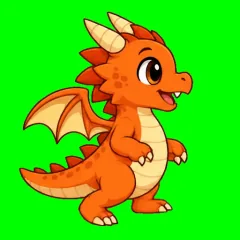
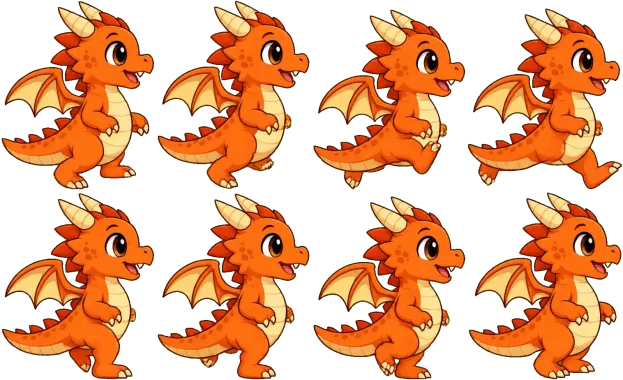
Where the video comes from
Video is the most practical source for frame-by-frame character animation. Render a walk cycle from Blender, record gameplay of a 3D prototype, or generate a clip with an image-to-video model. AI video models keep a character consistent across frames, which is the hardest part of making sprites by hand; our AI sprite sheet generator (coming soon) is built on this approach.
For the cleanest result, ask for: a locked-off camera, the character moving in place (like on a treadmill), a solid chroma background, and no motion blur or particles.
Settings explained
| Setting | What it does | Typical value |
|---|---|---|
| Sample rate | How many frames per second are pulled from the video before selection | 12 fps |
| Frames in animation | Evenly picks this many frames from the selected range | 6–8 (walk), 4 (idle) |
| Skip duplicate frames | Drops frames that barely changed, common at the start of generated clips | On |
| Tolerance / softness | How far from the key colour a pixel can be and still be removed / partially removed | 60 / 40 |
| Edge cleanup | Removes the coloured halo left by video compression; “Protect outlines” is gentler on thin dark or grey outlines | Strong |
| Pixel art | Downscales with area averaging and maps every frame to one shared palette | 32–64 px, auto 16 colours |
Using the export in your engine
Godot 4: put the PNG and the
.tresfile in your project and assign the resource to an AnimatedSprite2D.Phaser / PixiJS: load the PNG with the JSON atlas (
this.load.atlas); frame names arename_00,name_01…Unity: import the PNG, set Sprite Mode to Multiple and slice by cell size (shown above the sheet preview).
GameMaker: use the horizontal strip layout (columns = single row) or the frames ZIP.
FAQ
Is the video uploaded to a server?
No. Frames are extracted and processed in your browser with the Canvas API, so the file never leaves your computer.
Which video formats work?
Anything your browser can play: MP4 (H.264) and WebM work everywhere; MOV/HEVC works in Safari. Files can be up to 500 MB, and the first 10 seconds are used: a longer video is trimmed automatically, so cut it to the action you need first if it is further in. At a high sample rate the tool may load fewer seconds to stay within browser memory, and tells you how many.
How do I get a transparent background?
Record or render the animation on a flat chroma colour such as pure green (#00FF00) or magenta (#FF00FF). The converter detects the border colour, removes it and cleans the coloured fringe that video compression leaves around the edges.
Why does my character wobble in the engine?
Each frame is cropped differently, so the feet move. Keep “Lock character to a fixed anchor” on: every frame is placed so the anchor point stays in the same spot, and the pivot is written into the JSON.
More free sprite tools
GIF to Sprite Sheet
Split an animated GIF into frames and pack them into an engine-ready sprite sheet.
Sprite Sheet Maker
Pack separate PNG frames into one sprite sheet with a JSON atlas and Godot resource.
Sprite Sheet to GIF
Preview a sprite sheet as a looping animation and export a transparent GIF.
Sprite Sheet Cutter
Slice a sprite sheet into individual PNG frames by grid, with automatic grid detection.
AI Sprite Sheet Generator
coming soon: create a new animated character from a text description.