 SpriteSheetGen

How to cut a sprite sheet
1. Upload the sheet
Upload the sprite sheet (PNG, WebP or JPG).
2. Check the grid
Check the detected columns and rows. The animation preview shows immediately whether the grid is right.
3. Clean up (optional)
Remove a solid background, re-align frames to a common anchor or convert to pixel art.
4. Download the frames
Download all frames as a ZIP, or re-pack them into a new sheet with a different layout.
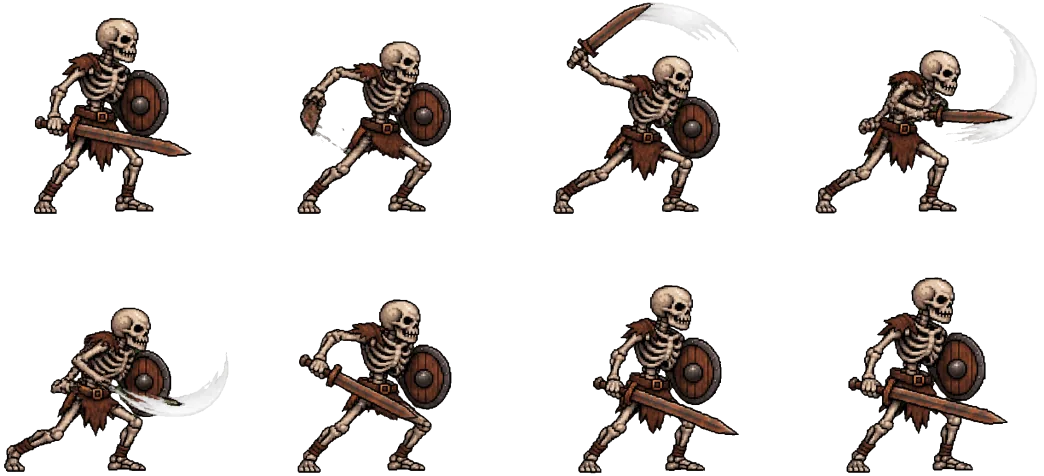
Example: a 4 × 2 sheet cut into frames
Common uses
Extract frames from an asset pack to edit them in Aseprite or Photoshop.
Re-pack a multi-row sheet into a single row strip for GameMaker.
Fix a sheet whose frames are not centred, so the character stops sliding in the engine.
Related: sprite sheet to GIF, sprite sheet maker and the AI sprite sheet generator (coming soon), which will create new animated characters from a description.
FAQ
How do I split a sprite sheet into individual images?
Upload the sheet, confirm the number of columns and rows, then click “Download frames (ZIP)”. Each cell becomes its own PNG named name_00.png, name_01.png and so on.
Can it handle sheets with spacing or margins?
On sheets with a transparent background, the grid, outer margin and cell size are detected from the empty gutters between sprites. If you change the columns or rows by hand, the sheet is divided evenly instead. Re-aligning trims each frame to its content.
What if the sheet has a coloured background?
Turn on “Remove solid background” to key out the colour so the exported frames are transparent.
More free sprite tools
Video to Sprite Sheet
Turn an MP4 or WebM clip into a clean, aligned sprite sheet with a transparent background.
GIF to Sprite Sheet
Split an animated GIF into frames and pack them into an engine-ready sprite sheet.
Sprite Sheet Maker
Pack separate PNG frames into one sprite sheet with a JSON atlas and Godot resource.
Sprite Sheet to GIF
Preview a sprite sheet as a looping animation and export a transparent GIF.
AI Sprite Sheet Generator
coming soon: create a new animated character from a text description.